iPhone Duo gets face unlock in iOS 27.3 beta: how it works, and how safe it is
iOS 27.3 beta 2 lets a closed iPhone Duo unlock with its front camera. It isn't Face ID: how it works, its limits, how safe it is, and how to try it.
Disclosure: This article may contain affiliate links. If you buy through them we may earn a small commission at no extra cost to you. It never influences our editorial opinion. As an Amazon Associate, GeekyGoo earns from qualifying purchases.
The iPhone Duo has never had Face ID. Since launch you’ve unlocked it with the Touch ID sensor in the side button, your Apple Watch or your passcode. That changes with iOS 27.3 beta 2, which Apple released to developers on 16 November (build 24C5049d). It adds a new option called Unlock with Front Camera: when the Duo is closed, it can recognise your face and unlock, a bit like Face ID.
It isn’t Face ID, though, and Apple is upfront about that. Here’s how the new feature works, what it can’t do, how safe it is, and how to try it.
In short:
- What it is: face unlock using the 12MP Center Stage camera on the outer screen.
- When it works: only when the Duo is folded shut. Unfolded, you still use Touch ID or your passcode.
- What it unlocks: the Lock Screen only. Apple Pay, your passwords and locked apps still need Touch ID or your passcode.
- The catch: it only works if you’ve used Touch ID or your passcode recently. After about 45 minutes without that, it switches off until you do.
- How safe: Apple warns it “isn’t as secure as Touch ID or Face ID.”
- Availability: developer beta only for now. The public release is expected in December, though Apple hasn’t given a date.
What “Unlock with Front Camera” does
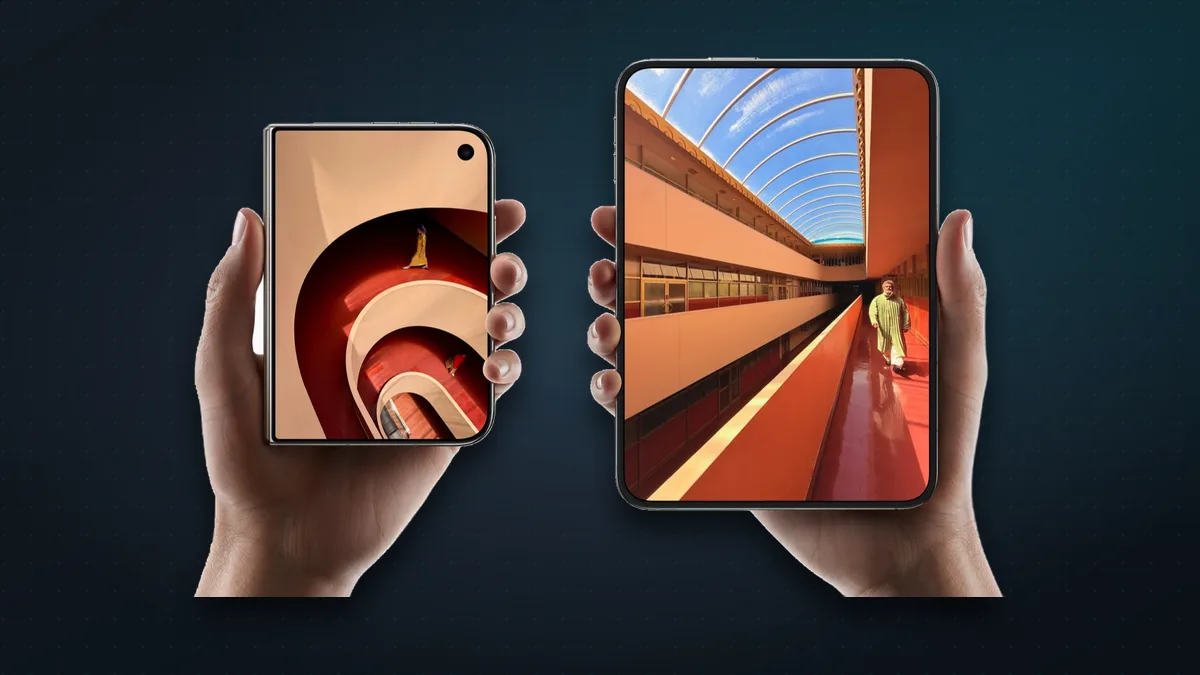
Once you turn it on, the Duo looks for your face whenever you pick it up closed and wake the 5.4-inch outer screen. If it recognises you, it skips the Lock Screen, the same way Face ID does on other iPhones. AppleInsider reports that a small face icon appears where the fingerprint prompt would usually be.
It uses the 12MP Center Stage front camera at the top right of the outer screen, the same camera you’d use for a selfie with the phone folded. It does not use the hidden camera under the inner screen, which is why the feature only works closed. Some outlets say that’s because the under-display camera’s image quality is lower; Apple hasn’t said why.

Four limits matter:
- Closed only. Open the Duo and you’re back to Touch ID, Apple Watch unlock or your passcode.
- Lock Screen only. Apple Pay, the Passwords app and password autofill still ask for Touch ID or your passcode, and so do apps you’ve locked.
- A recent Touch ID or passcode is required. Face unlock piggybacks on your last “real” unlock. Leave the phone for about 45 minutes and it stops working until you use Touch ID or your passcode again.
- It’s a beta. Apple could change how it works, or remove it, before iOS 27.3 ships.
Touch ID and Apple Watch unlock keep working alongside it, so you don’t lose anything by turning it on. AppleInsider found that if your face isn’t recognised, the phone simply falls back to Touch ID.
How secure is it? It isn’t Face ID
This is the important bit. Face ID uses Apple’s TrueDepth system, which projects tens of thousands of invisible dots to build a 3D map of your face. Apple rates it at about 1 in 1,000,000 for a random stranger unlocking your phone. The iPhone Duo has no TrueDepth hardware. Its face unlock works from an ordinary camera image, which is the approach many Android phones use.
Apple’s own setup screen says the feature offers convenience but isn’t as secure as Touch ID or Face ID. In a statement to Gizmodo, Apple said its accuracy is roughly the same as Touch ID’s 1 in 50,000 false-match rate, and called it one of the most secure camera-based face unlock systems. That’s Apple’s claim, as reported by one outlet; no independent test has checked it yet.
Early hands-on testing is encouraging:
- Engadget said it unlocks faster than Touch ID, and a photo of the tester didn’t fool it.
- AppleInsider tried photos and a video of the tester’s face, and neither unlocked the phone.
- MacRumors and Engadget both found it struggles in a dark room, though it’s fine in normal light.
The limits make more sense in that light. Keeping Apple Pay and passwords behind Touch ID, and switching face unlock off after a stretch without a fingerprint or passcode, means a lookalike or a good fake can’t get at your money or accounts. Apple says the face data never leaves your device.
Should you turn it on? For most people, yes, once it’s out of beta. It’s a convenience feature with sensible guard rails. If you’re worried about someone forcing the phone up to your face, or you have a twin, leave it off and stick with Touch ID. Either way, it’s worth turning on Stolen Device Protection and the other settings in our iPhone security settings guide.
Why the iPhone Duo didn’t have Face ID
Apple put Touch ID in the side button so unlocking works the same way whether the Duo is open or closed. Face ID needs a TrueDepth camera module, and there’s very little room for one in a phone that’s just 5.2 mm thick when open.
Not every reviewer was happy about it. Several asked where Face ID was, and Marques Brownlee pointed out a deliberate pause before each Touch ID unlock goes through. Apple told Engadget the pause keeps the experience consistent and gives you a moment to see your notifications. Face unlock is partly Apple’s answer to that complaint, at least for the closed phone.
Thinking of buying one? Our is the iPhone Duo worth it? guide weighs it up, and we’ve covered the hinge-crack problem and what to do too.
Also new: Close to Lock
The same beta adds Close to Lock, in Settings > Display & Brightness. With it on, folding the Duo shut locks the phone, instead of carrying whatever you were doing over to the outer screen. Testers report conflicting things about whether it’s on by default, so check the setting after you update.
How to turn on face unlock (beta)
On an iPhone Duo running iOS 27.3 beta 2 or later:
- Open Settings > Touch ID & Passcode and enter your passcode.
- Scroll down and turn on Unlock with Front Camera.
- Follow the setup, holding the closed Duo in front of your face.
To get the beta, go to Settings > General > Software Update > Beta Updates and choose iOS 27 Developer Beta. That needs an Apple developer account, but the free one is enough. People in the public beta are still on beta 1, which doesn’t include face unlock yet, so they’ll have to wait for public beta 2.
Should you install the beta? Not on a phone you rely on, especially a $1,999 one. Betas can have bugs, drain battery and break apps, and going back to the public release isn’t simple. If you do try it, back up first. For most people the better option is to wait a few weeks for the public release.
When is iOS 27.3 coming?
Apple hasn’t given a date. Its only official word is that the redesigned Health app, which is part of iOS 27.3, will roll out “later this year”. MacRumors, Engadget and 9to5Mac all expect a release in December, probably the first half, based on past updates. Treat that as an estimate.
What else is in iOS 27.3
Besides face unlock and Close to Lock, beta 2 adds:
- Siri AI can read the whole web page in Safari, including the parts you haven’t scrolled to, and answer questions about it.
- Siri AI can answer questions using your Health data, if you give it permission.
- Daily limits on Apple Intelligence requests that run on Apple’s servers, with higher limits on bigger iCloud+ plans.
- Calendar’s Search and Add buttons move to the bottom of the screen, within easy reach of your thumb.
- Video podcasts in the Apple TV app.
- Apple News+ Puzzles in Australia, the UK and French-speaking Canada.
Beta 1, from 3 November, brought the redesigned Health app, vertical tabs in Safari, new Siri AI actions in Apple’s apps and Reachability for the iPhone Duo. Catch up on the previous update in our guide to what’s new in iOS 27.2.
Will the next iPhone Duo get real Face ID?
Possibly. Bloomberg’s Mark Gurman reported in October that Apple is testing iPhone Duo 2 prototypes with Face ID hidden under the outer screen, but hasn’t decided whether to ship it. The next Duo is expected around autumn 2027. For now, face unlock through the Center Stage camera is as close as the Duo gets.
iPhone Duo price in the US and India
The iPhone Duo starts at $1,999 in the US and ₹2,99,900 in India, for the 256 GB model. It went on sale on 23 October 2026 in both countries. Face unlock is a software feature, so it will come to every iPhone Duo for free with iOS 27.3, including in India. If you have one, our picks of the best iPhone Duo apps and cases and accessories are worth a look.
FAQ
Does the iPhone Duo have Face ID? No. The iPhone Duo uses Touch ID in the side button. iOS 27.3 adds a separate face unlock feature that uses the outer screen’s front camera, but Apple says it isn’t Face ID and isn’t as secure.
How do I turn on face unlock on iPhone Duo? On iOS 27.3 beta 2 or later, go to Settings > Touch ID & Passcode and turn on Unlock with Front Camera. It’s in the developer beta for now; everyone else gets it when iOS 27.3 is released.
Does iPhone Duo face unlock work when the phone is open? No. It only works when the Duo is closed and you’re using the outer screen. When it’s unfolded, you unlock with Touch ID, your Apple Watch or your passcode.
Can I use iPhone Duo face unlock for Apple Pay? No. Apple Pay, the Passwords app, password autofill and locked apps still need Touch ID or your passcode.
Is iPhone Duo face unlock safe? Apple says it isn’t as secure as Touch ID or Face ID, but told Gizmodo its accuracy is close to Touch ID’s 1 in 50,000. Early testers couldn’t fool it with photos or videos. Its limits, such as no Apple Pay and switching off after about 45 minutes without Touch ID, reduce the risk.
When will iOS 27.3 be released? Apple says “later this year”. Most reports expect December 2026.
Watch: this guide in 3 minutes
More short videos
Sources & further reading
- Apple Developer — Releases (iOS 27.3 beta 2, build 24C5049d, 16 Nov 2026)
- Apple Newsroom — Apple unveils iPhone Duo (9 Sep 2026)
- Apple — iPhone Duo technical specifications
- Apple Support — Wake, unlock and lock iPhone
- Apple Support — iPhone Duo at a glance (camera and button locations)
- Apple Newsroom — Redesigned Health app expands language support (3 Nov 2026)
- 9to5Mac — iOS 27.3 adds new face unlock feature for iPhone Duo (16 Nov 2026)
- MacRumors — iPhone Duo face unlock hands-on (16 Nov 2026)
- MacRumors — Everything new in iOS 27.3 beta 2 (16 Nov 2026)
- AppleInsider — Apple's face unlock for iPhone Duo works well (16 Nov 2026)
- Engadget — iPhone Duo gets face unlock with the latest iOS 27 beta (16 Nov 2026)
- Gizmodo — Apple on iPhone Duo face recognition (16 Nov 2026)
- MacRumors — iPhone Duo Touch ID complaints from reviewers (21 Oct 2026)
- MacRumors — Gurman: iPhone Duo 2 prototypes with under-display Face ID (22 Oct 2026)
Keep reading
iPhone Duo screen cracked at the hinge, or a white line? What to do (and what it costs)
Some iPhone Duo inner screens are cracking at the hinge. Apple is replacing affected phones, even without AppleCare+. What to do, and what repairs cost.
Read more →
Is the iPhone Duo worth $2,000? 7 reasons it might be (and who should skip it)
The iPhone Duo costs $1,999 (₹2,99,900). Seven ways it earns that price, how it compares with an iPhone 18 Pro plus iPad mini, and who should skip it.
Read more →
The best iPhone Duo apps, and the big ones that aren't ready yet
Which apps make the most of the iPhone Duo's folding screen, from Netflix and Fantastical to games that use the hinge, plus popular apps that aren't ready yet.
Read more →