PomoSpot: a free lofi Pomodoro timer with your own music, study rooms and focus stats
PomoSpot is a free lofi Pomodoro timer in your browser: lofi or your own Spotify and Apple Music, rain sounds, focus stats and shared study rooms.
Disclosure: PomoSpot is made by Image Devices, the company behind GeekyGoo. It’s our own project, so read this as an introduction from the people who built it, not an independent review.
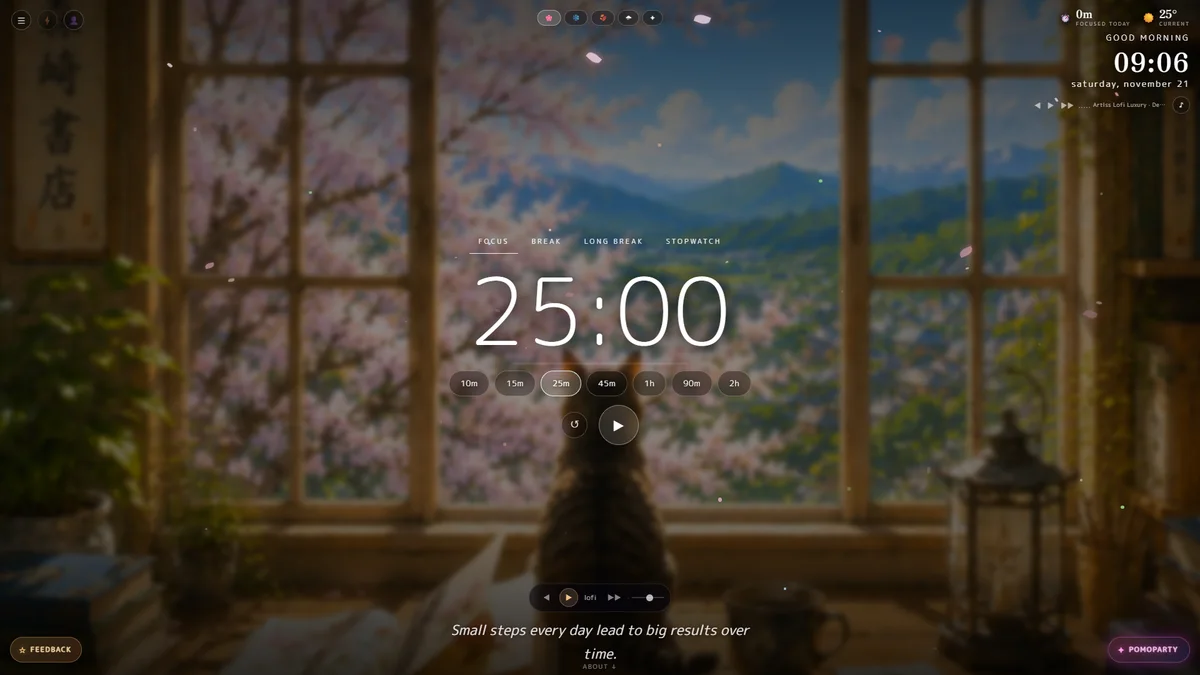
Most focus timers are a white box with black numbers. That’s fine for boiling an egg, and miserable for a three-hour study session. PomoSpot is a different kind of timer: a calm, painted lofi scene on your desktop, with a Pomodoro timer floating in front of it, music playing, rain on the window and your task list one click away.
It’s a website, not an app you download. Open pomospot.com in your browser on a desktop or laptop and it’s ready. It also works on phones. You don’t need an account, and it’s free.
And it isn’t only for work. Plenty of people leave it open just for the music and the view.
PomoSpot at a glance:
- Price: free. No download, no sign-up needed.
- Timer: Focus, Break, Long Break and Stopwatch, with lengths from 10 minutes to 2 hours.
- Music: four built-in lofi moods, or your own music from Spotify or Apple Music.
- Sounds: rain, thunder, café, fire, wind, birds, a river or a train, mixed to taste.
- Stats: focus time today, this week and all time, your best day and your streak.
- Sync: optional sign-in with Google, Apple or email keeps your stats and tasks on every device.
- Study rooms: create a room and everyone who joins runs on the same timer.
The timer: classic Pomodoro, or longer blocks
The idea behind the Pomodoro Technique is simple: work on one thing for a fixed block, take a short break, and repeat, with a longer break after four rounds. PomoSpot gives you four modes across the top of the screen, Focus, Break, Long Break and Stopwatch, and a row of lengths underneath: 10, 15, 25 and 45 minutes, 1 hour, 90 minutes and 2 hours.
Some rhythms that work well:
| Rhythm | Good for |
|---|---|
| 25 / 5 | The classic. Starting a task, memorising, short attention days |
| 50 / 10 | Essays, reading, problem sets |
| 90 / 20 | Deep work: writing, coding, design |
| 10 or 15 minutes | Getting started when you really don’t want to, or shorter attention spans |
Press play and a soft chime sounds when the block ends. The timer, chime and music keep running if you switch to another tab, so you can keep PomoSpot open in the background while you work. If you’d rather not count down, the Stopwatch simply counts how long you’ve been at it.
A calm scene you’ll actually want to leave open
The timer sits over a slow, painted window scene in a soft, anime-inspired style: a wooden window frame, a bookshop sign, a lantern, and a cat on the sill watching the town outside. Choose from four seasons with the buttons at the top: cherry blossom, snow, autumn and rain, each with its own falling petals, snowflakes, leaves or raindrops.
The view also follows your clock. Morning, evening and night each have their own painting: blossom and blue mountains after breakfast, a golden snowy evening with the cat curled up asleep, and a moonlit town late at night.
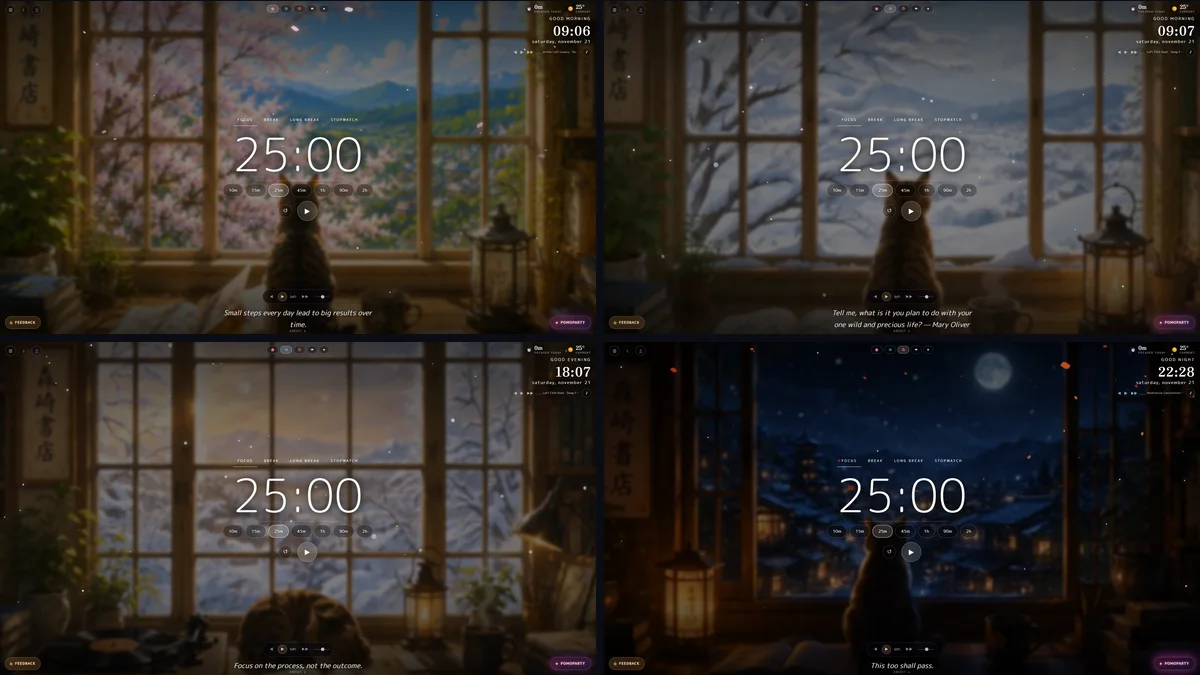
A quiet quote changes at the bottom of the screen, and the top corner shows the time, the date and the weather. If your computer is older, Lite mode turns down the blur effects to keep things smooth.
Lofi music, ambient sounds, or your own Spotify and Apple Music
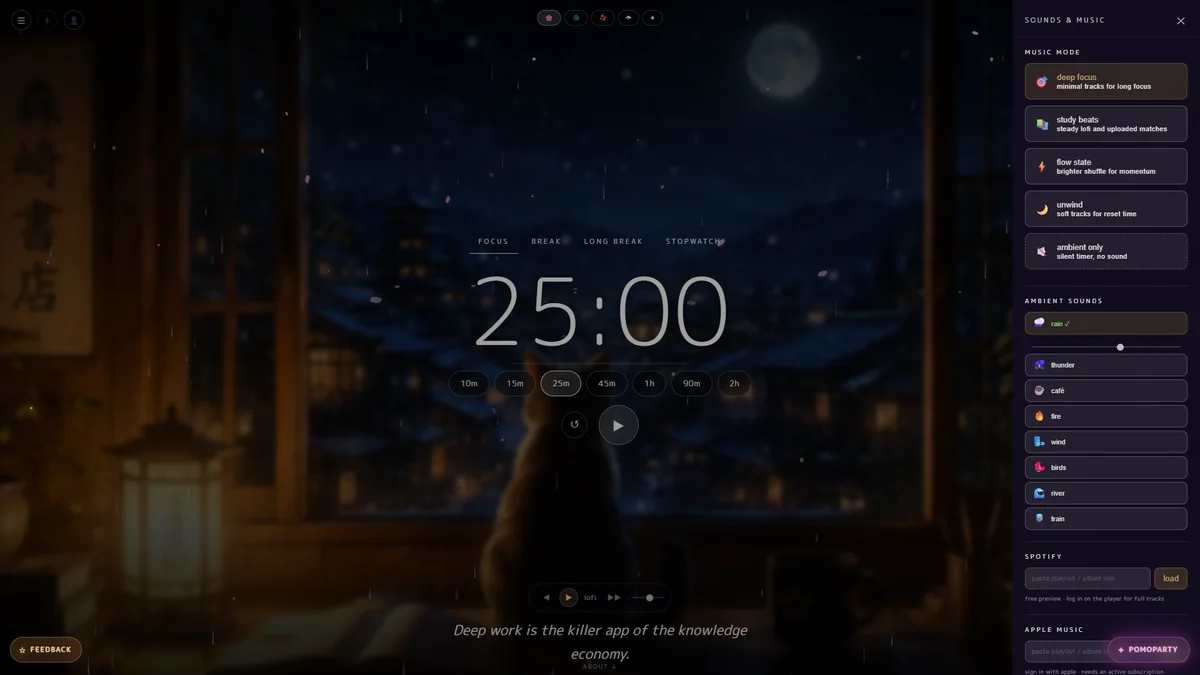
Music is the heart of PomoSpot. Open the Sounds & Music panel and pick a mood:
- Deep focus: minimal tracks for long sessions.
- Study beats: steady lofi hip-hop.
- Flow state: a brighter shuffle for momentum.
- Unwind: soft tracks for breaks, or just for relaxing.
- Ambient only: no music, just the sounds below.
Under the music you can layer rain, thunder, café murmur, fire, wind, birds, a river or a train, each with its own volume. Rain plus a little café noise is a favourite for long study nights.
Prefer your own playlists? Paste a Spotify link and it plays inside the timer (you get previews until you log in on the player for full tracks), or sign in to Apple Music to play from your library if you have a subscription. Your music, PomoSpot’s scene and timer, all in one window.
Tasks and focus stats
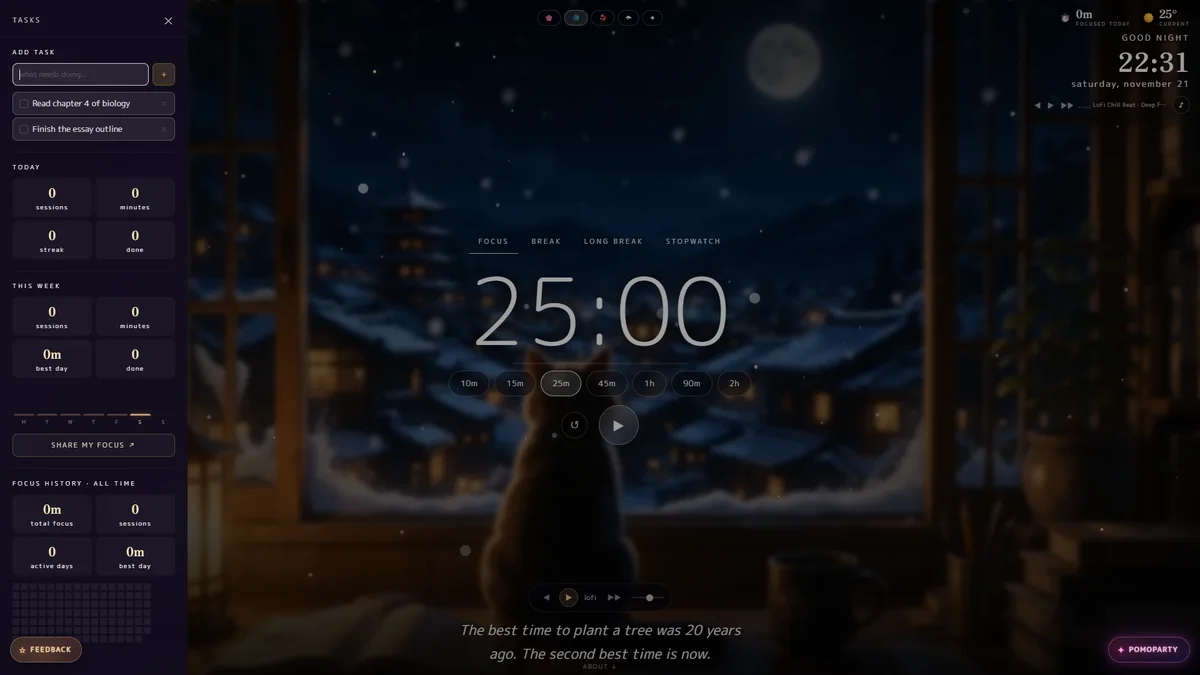
Open the Tasks panel and add the one thing this block is for, then tick it off when it’s done. Underneath, PomoSpot keeps score for you: sessions and minutes today and this week, your best day, your streak of active days, and an all-time focus history grid that fills in as you go. Share my focus turns your stats into something you can post.
All of this stays in your browser by default. Sign in with Google, Apple or email and your stats and tasks sync, so the focus you put in on your laptop shows up on your desktop too.
PomoParty: study rooms on one shared timer
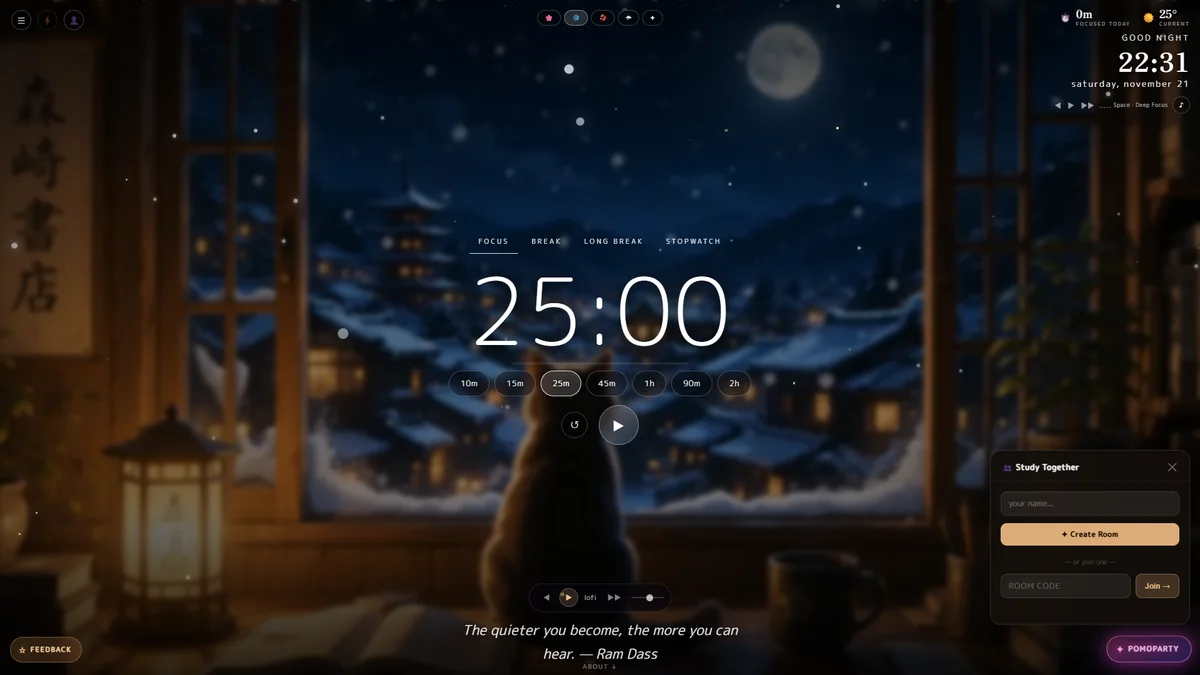
Studying alone is hard; studying “together” with friends on a video call is often worse. Tap PomoParty, create a room, and you get a six-character code. Anyone who joins with that code sees the same timer: when the host presses play, everyone starts together, and pauses and resets stay in sync. A small chat sits under the timer for break check-ins, and each person keeps their own music and scene, so only the clock is shared.
It works just as well for remote teams who want quiet co-working hours, or for a study group the night before an exam.
For streamers: a free timer overlay
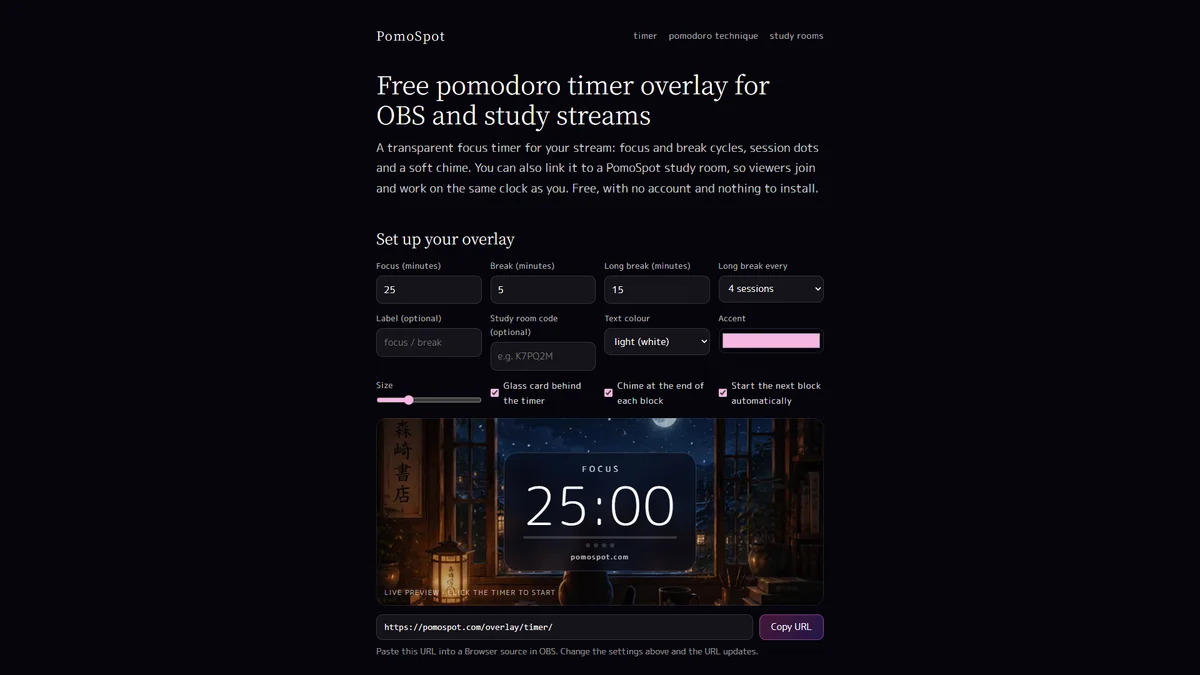
If you stream study or work sessions, PomoSpot has a free Pomodoro overlay for OBS: set your focus and break lengths, colours and size, copy the link, and add it as a Browser source. You can even link the overlay to a study room, so your viewers work on the same clock as you.
Privacy
PomoSpot works without an account. Your settings, tasks and focus stats are kept in your browser’s local storage, on your own device, and aren’t sent anywhere unless you sign in and turn on sync. Spotify and Apple Music play through your own accounts with those services.
Start your first session in 30 seconds
- Go to pomospot.com on your desktop or laptop.
- Pick a scene and a mood: try cherry blossom with study beats and a little rain.
- Add one task, choose 25m, and press play.
- When the chime sounds, switch to Break, stretch, and come back.
Who is PomoSpot for?
- Students who want a calmer way to get through revision, with stats that show real progress.
- Remote workers who need longer focus blocks and a stopwatch for tracking time.
- Friends and study groups who want to work “together” without a noisy video call.
- Anyone who finds short blocks easier: the 10 and 15-minute settings are a gentle way to start.
- Lofi fans who just want beautiful music, rain on the window and a cat for company.
FAQ
Is PomoSpot free? Yes. The timer, music, ambient sounds, tasks, stats and study rooms are all free. Spotify and Apple Music use your own accounts.
Do I need to download anything? No. PomoSpot is a website, so it runs in your browser on a desktop or laptop (and on phones). There’s nothing to install.
Do I need an account? No. An account is optional and only needed if you want your tasks and focus stats synced between devices. You can sign in with Google, Apple or email.
Can I play my own music? Yes. Paste a Spotify link, or sign in to Apple Music with an active subscription, and it plays inside the timer.
Does the timer keep running if I switch tabs? Yes. Keep the PomoSpot tab open and the timer, chime and music carry on in the background.
How do study rooms work? Tap PomoParty, create a room and share the six-character code. Everyone who joins sees the same timer, and the host’s play, pause and reset are synced for all.
Who makes PomoSpot? Image Devices, the company behind GeekyGoo. If you like calm, focused apps, we also make the free games site Crater Arcade and the cross-platform file-sharing app AirLan.
Sources & further reading
Keep reading

How to set up Grok Bot AI agents for your inbox, travel and bills (and 7 safety settings to change first)
Grok Bot 1.0 runs always-on AI agents that work while you sleep. Which agents to set up first, what it costs in dollars and rupees, and the safety settings to change before you connect your email.
Read more →
The best Grok Bot plugins and skills in 2026: 14 to add first (and what to skip)
Grok Bot is xAI's always-on AI agent. The 14 plugins and skills to add first, for email, Notion, Slack, Canva, research and shopping, and how to stay safe.
Read more →
iOS 27.2: every new feature, and should you update?
iOS 27.2 brings Siri AI in five more languages, Messages suggestions, Apple TV profiles, Pencil on iPhone Duo and 162 security fixes. Everything new, explained.
Read more →