Why does my iPhone stop charging at 80%? The 4 reasons, and how to fix each
An iPhone stuck at 80% is usually doing it on purpose: Optimized Battery Charging, a charge limit, heat or Clean Energy Charging. How to tell which, and fix it.
You plug your iPhone in overnight, wake up, and it says 80%. Or it races to 80% and then sits there for hours. It looks like a fault, but it almost never is. Your iPhone is stopping at 80% on purpose, to make its battery last longer.
There are four reasons it does this, and each has its own fix. Here’s how to tell which one you’re seeing, and how to get to 100% when you need to.
Quick answer:
| You see | The reason | The fix |
|---|---|---|
| A “finish charging by” notice | Optimized Battery Charging | Touch and hold it, tap Charge Now |
| It stops at 80% every time | A charge limit (iPhone 15+) | Settings > Battery > Charging |
| The phone feels warm | Heat protection | Cool it down, remove the case |
| You’re in the US | Clean Energy Charging | Settings > Battery > Charging |
Why 80%, anyway?
iPhone batteries are lithium-ion, and they wear out faster when they spend a long time full and when they get hot. Apple says a battery’s “chemical age” depends on its temperature history and charging pattern, not just how old it is. Holding the charge at 80% for a while, and topping up just before you need the phone, reduces that wear.
It matters, because batteries are rated in charge cycles. Apple says the batteries in the iPhone 14 and earlier are designed to keep 80% of their original capacity after 500 full cycles, and those in the iPhone 15 and later after 1,000 cycles, in ideal conditions. Less time at 100% and less heat help you get there.
Reason 1: Optimized Battery Charging
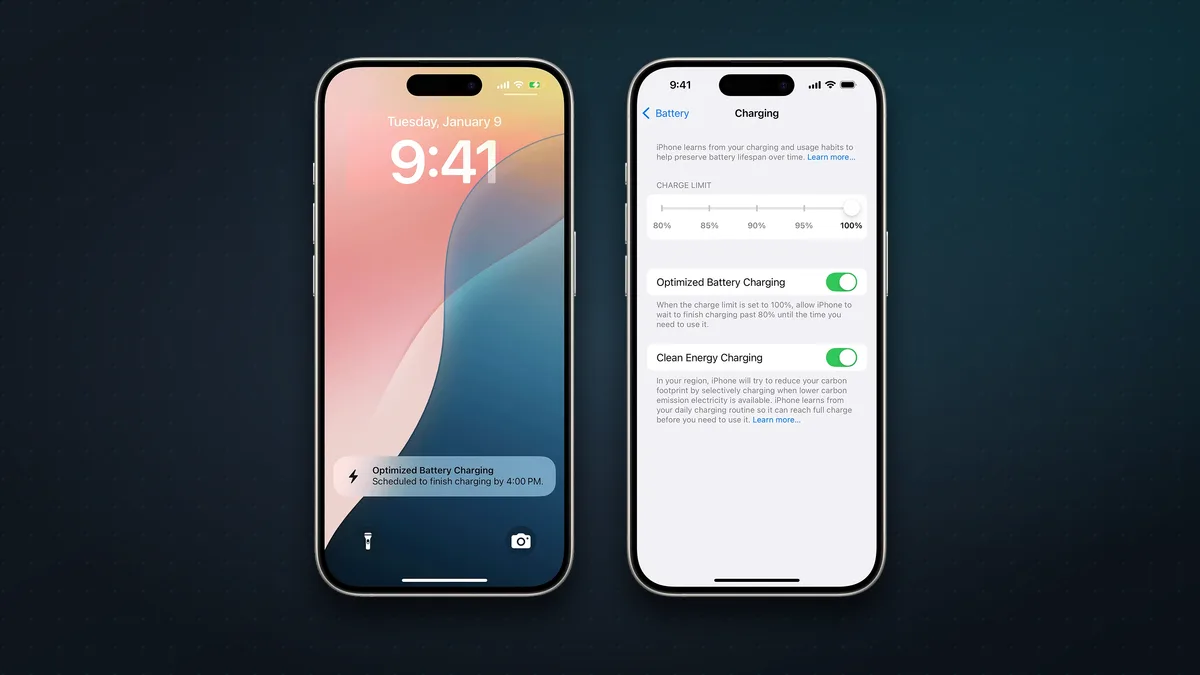
This is the most common reason, and it’s on by default. Your iPhone learns your routine, for example that you charge overnight and unplug at 7 am. When it expects to stay on the charger for a long time, it charges to 80%, waits, and then finishes so it reaches 100% just before you usually unplug.
When it’s doing this, a notification on the Lock Screen says when your iPhone will be fully charged. To skip the wait, touch and hold the notification and tap Charge Now.
A few things to know:
- It needs time to learn. Apple says it won’t kick in for at least 14 days, and only after at least 9 charges of 5 hours or more in one place.
- It only works where you charge regularly, like home or work, not when you’re travelling or charging in short bursts. It uses location settings to know where you are, but Apple says that information isn’t sent to Apple.
- To turn it off: on an iPhone 15 or later, go to Settings > Battery > Charging. On an iPhone 14 or earlier, go to Settings > Battery > Battery Health & Charging. Apple warns that turning it off can increase battery wear, so most people should leave it on.
Reason 2: A charge limit (iPhone 15 and later)
If your iPhone stops at 80% every single time, even during the day, you probably have a Charge Limit set. On the iPhone 15 and later, you can cap charging anywhere from 80% to 100%, in 5% steps, in Settings > Battery > Charging.
How it behaves:
- It charges to within a few percent of your limit, then stops.
- If the charge drops more than 5% while it’s still plugged in, it tops up again.
- Every so often it charges to 100% anyway, to keep its battery-level readings accurate. So seeing 100% now and then with an 80% limit is normal.
- iOS may suggest a limit based on your habits, for example “a charge limit of 95% is recommended”.
- Optimized Battery Charging only appears when the limit is 100%.
Should you keep an 80% limit? If your phone easily lasts the day on 80%, it’s a sensible way to slow battery wear, especially if you keep phones for three years or more. If you often end the day in the red, set it back to 100% and let Optimized Battery Charging do the work instead.
Reason 3: Your iPhone is too warm
Heat is the big one in India. Apple says that if the battery gets too warm, software may limit charging above 80%. Charging carries on once the phone cools down.
Apple’s ideal range for an iPhone is 16°C to 22°C, and it advises against using or charging it when it’s above 35°C around you, which can permanently reduce battery capacity. In an Indian summer, that’s most afternoons. Common causes:
- A hot car, a sunny windowsill or a bed that traps heat.
- Using the phone hard while charging: games, video calls, navigation or hotspot.
- Some cases. Apple says charging inside certain cases can cause extra heat, so take the case off if the phone gets hot on the charger.
- Fast or wireless chargers, which produce more heat than a slow wired charge.
The fix: unplug for a few minutes, take off the case, move the phone and charger somewhere cooler, and stop using it while it charges. It’ll go past 80% once it cools.
Reason 4: Clean Energy Charging (US only)
If you’re in the United States, there’s one more. Clean Energy Charging, on by default there since iOS 16.1, uses a forecast of your local grid’s carbon emissions and waits to charge when cleaner electricity is available. Like Optimized Battery Charging, it only works where you regularly charge for long periods, and it still aims to finish before you need the phone.
To turn it off, go to Settings > Battery > Charging (iPhone 15 or later) or Battery Health & Charging (iPhone 14 or earlier). It isn’t available in India.
How to charge to 100% right now
- See a “finish charging” notice? Touch and hold it and tap Charge Now.
- iPhone 15 or later? Check Settings > Battery > Charging and set the limit to 100%.
- Warm? Unplug, remove the case, cool it down, then plug in again.
- In the US? Turn off Clean Energy Charging if you need a full charge tonight.
Still stuck at 80% (or charging slowly)?
If none of the four reasons fit, rule out a hardware or accessory problem:
- Try a different cable and adapter, plugged straight into a wall socket.
- Clean the charging port. Lint packs into USB-C ports over time. Gently clear it with a wooden toothpick, nothing metal.
- Restart your iPhone and make sure you’re on the latest iOS.
- Check Battery Health in Settings > Battery. If it says service is recommended, the battery may need replacing.
If it still won’t charge properly, contact Apple Support or visit an Apple Authorised Service Provider.
FAQ
Is it bad to charge my iPhone to 100%? No. It’s safe. Apple says your iPhone stops charging when it’s full and only tops up again below 95%. Spending long hours at 100% in the heat adds a little extra wear, which is what these features try to avoid.
Is it OK to leave my iPhone charging overnight? Yes. Apple says it’s safe, and Optimized Battery Charging is designed for exactly that.
Why does my iPhone sometimes go to 100% when I set an 80% limit? That’s deliberate. It charges fully now and then to keep its battery percentage accurate.
Why can’t I find the Charge Limit setting? It’s only on the iPhone 15 and later. Older iPhones have Optimized Battery Charging but no adjustable limit.
Why does my iPhone stop at 80% only in summer? Almost certainly heat. Charge it somewhere cooler, out of its case, and not while you’re using it heavily.
More iPhone help: 12 iPhone tips and tricks for 2026 and which iPhone to buy.
Sources & further reading
- Apple — About Charge Limit and Optimized Battery Charging on iPhone
- Apple — If your iPhone won’t charge (stopped charging at 80 percent)
- Apple — If Optimized Battery Charging doesn’t activate
- Apple — Charge and maintain your iPhone battery
- Apple — iPhone battery and performance
- Apple — Use Clean Energy Charging on your iPhone
- Apple — Batteries: maximizing performance
Keep reading
iPhone Duo screen cracked at the hinge, or a white line? What to do (and what it costs)
Some iPhone Duo inner screens are cracking at the hinge. Apple is replacing affected phones, even without AppleCare+. What to do, and what repairs cost.
Read more →
iOS 27.2: every new feature, and should you update?
iOS 27.2 brings Siri AI in five more languages, Messages suggestions, Apple TV profiles, Pencil on iPhone Duo and 162 security fixes. Everything new, explained.
Read more →
12 iPhone tips and tricks worth knowing in 2026
A dozen genuinely useful iPhone features Apple buries a menu too deep, from a physical camera shutter to disposable email. Most take a minute to set up.
Read more →