Apple HomeView reviews are in: is the $299 (₹39,900) smart display worth it?
Apple HomeView is on sale. Reviewers love the hardware but flag missing apps and an unfinished Siri. Who should buy it, who should wait, and the real cost in India.
Disclosure: This article may contain affiliate links. If you buy through them we may earn a small commission at no extra cost to you. It never influences our editorial opinion. As an Amazon Associate, GeekyGoo earns from qualifying purchases.
Apple HomeView goes on sale today, 13 November. It’s Apple’s first smart display: a 7-inch square screen on a speaker base that runs your Apple Home, shows your photos, makes FaceTime calls and brings Apple’s new conversational Siri AI to the kitchen counter. It costs $299 in the US and ₹39,900 in India.
The first reviews landed this week, and they agree to a surprising degree: the hardware is lovely and the software isn’t finished. So the real question isn’t “is it good?” but “is it good for your home?” Here’s what reviewers found, who should buy one now, who should wait, and what it really costs in India.
We haven’t tested HomeView ourselves. This roundup draws on Apple’s specifications and the hands-on reviews linked below.
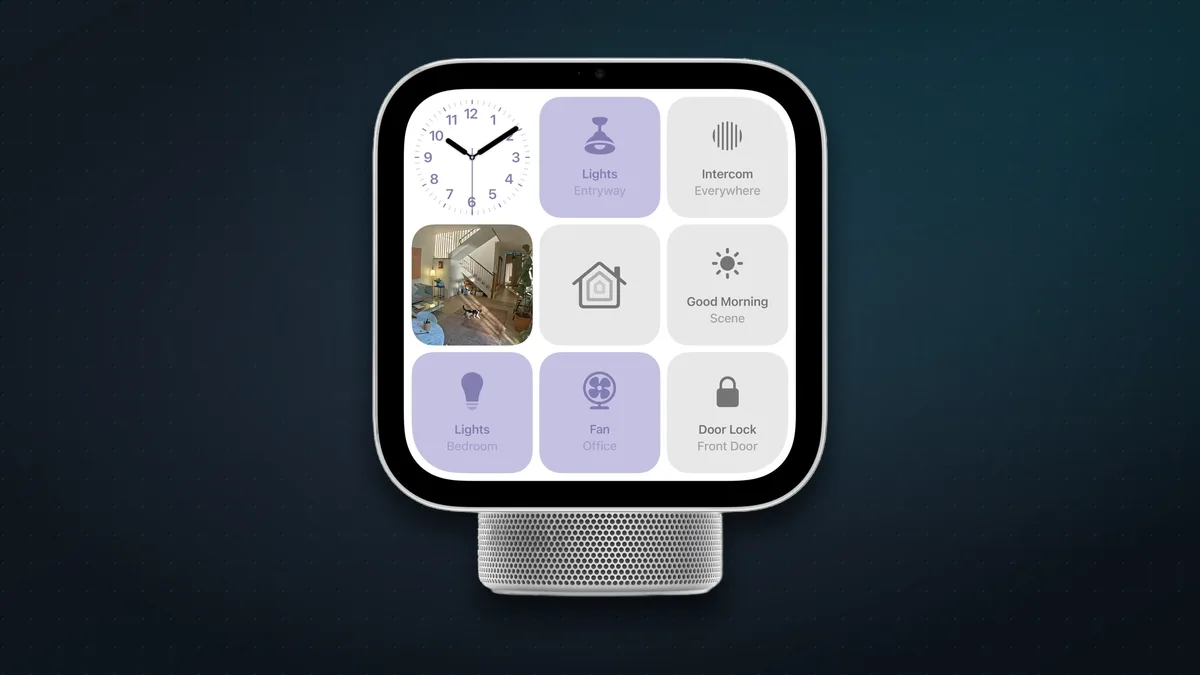
HomeView at a glance
| Apple HomeView | |
|---|---|
| Price | $299 / ₹39,900 |
| Screen | 7-inch square, 1088 × 1088 |
| Chip | A18 |
| Camera | 12MP Center Stage (FaceTime) |
| Smart home | Home hub, Thread, Matter |
| Assistant | Siri AI (beta, English only) |
| Models | Tabletop, or Wall Mounted |
The screen dims to just 0.3 nits, so it can sit by the bed without lighting up the room. There are four microphones, a temperature and humidity sensor, and Wi-Fi 6E. It also works as a home hub with Thread built in, so it can stand in for a HomePod mini or Apple TV as the brain of your Apple Home.
What reviewers loved
- It’s fast at the smart home basics. AppleInsider calls it the fastest way to control its Apple Home, with camera feeds that appear instantly. Six Colors also found it quick and responsive.
- It knows who’s looking at it. HomeView recognises up to six people by face and voice and shows each person their own messages, calendar and widgets. 9to5Mac says recognition works “surprisingly well”.
- It’s a great photo frame. The Photos face cycles through your shared albums, and 9to5Mac, Six Colors and AppleInsider all single it out as a highlight.
- Cooking help. It turns recipes from Safari into step-by-step cards with ingredient checklists and tappable timers. 9to5Mac, AppleInsider and Gear Patrol all singled this out.
- The sound is better than its size suggests. Reviewers put the tabletop model at about HomePod mini level, or a little above.
- No ads. Six Colors and AppleInsider both point out that, unlike Amazon’s and Google’s displays, HomeView doesn’t push promotions at you.

What reviewers didn’t like
- There’s no App Store. HomeView runs about 15 Apple apps. Third-party apps appear only if they already work with CarPlay, such as Spotify, Audible or Overcast, and they run from your iPhone, not on HomeView itself. Six Colors explains the CarPlay model in detail. There’s no Netflix and no YouTube app.
- Siri AI isn’t always reliable yet. It’s still labelled beta. 9to5Mac and Six Colors both hit hangs, “try again later” replies and requests routed to the wrong app. When it works, Six Colors says it’s genuinely impressive.
- You can’t unlock doors by voice, yet. At launch Siri won’t unlock locks or open garage doors on HomeView. Apple says a December update will let recognised users do that by voice, as MacRumors reports.
- The screens are hard to customise. You can’t add sensors to a screen layout or customise Control Center, and dimmable lights on the Home screen only switch fully on.
- It needs your iPhone nearby. Your personal Siri answers, messages and the third-party apps all depend on a recently unlocked iPhone close by. For the full Siri AI experience that iPhone needs to be an iPhone 15 Pro or newer.
- No volume buttons. Everything is touch or voice.
- It’s Apple Home or nothing. AppleInsider and Macworld both warn that it adds little if your gadgets live in other apps. Ring is the big gap: it doesn’t work with Apple Home.
Tabletop or Wall Mounted?
Both cost the same, but they aren’t the same deal:
- The tabletop model has the full speaker system (two drivers, a woofer and passive radiators), and it comes with a cable and 30W power adapter.
- The Wall Mounted model has only the two small drivers, so it sounds thinner. It comes with no mount, no cable and no power adapter. Apple’s mounts start at $59.95 (₹6,900) and go up to $129.95 (₹14,900) for the Power-over-Ethernet version due in early 2027. Hardwired mounts need an electrician.
Unless you really want it on the wall, the tabletop is the better buy.
Before you buy: a 60-second checklist
- Is everything in Apple’s Home app? Check that your lights, plugs, locks and cameras appear in the Home app, either natively or through Matter. Ring cameras, Zigbee-only bulbs and older Nest cameras are the usual problems.
- Does everyone use an iPhone? Family members on Android get a much more basic experience.
- Is your iPhone new enough? For Siri AI’s personal features you need an iPhone 15 Pro or later. HomeView setup needs iOS 27.2.
- Do you want to watch shows on it? If so, wait: there’s no native video app support.
- Are you happy in English? Siri AI and the whole interface are English only for now.
If you can tick all five, reviewers suggest you’ll love it. AppleInsider gives HomeView 2.5 out of 5 overall, but says it’s “an easy 4 out of 5” for people already invested in Apple Home.
HomeView in India: the real cost
HomeView launched in India on day one at ₹39,900 for either model. Before you order:
- English only, no Hindi. Siri AI and the interface are English only. In India you’ll also say “Hey Siri”: the shorter “Siri” wake word is limited to US, UK, Canadian and Australian English.
- The Wall Mounted model costs more than it looks. Add a mount from ₹6,900, plus a USB-C cable and a 20W or bigger power adapter, which aren’t in the box.
- The new Apple Home Collection isn’t coming to India yet. The LG and Schneider cameras, doorbell, lock, thermostats and sensors designed for HomeView are listed for the US, Canada and the UK only.
- Camera smarts need iCloud+. Recognising people, pets and packages on your cameras needs a qualifying iCloud+ plan.
- The cheaper alternatives are strong. Amazon’s Echo Show 11 costs ₹26,999 and the Echo Show 8 ₹23,999. Both have bigger screens, video apps and Alexa, and Alexa+ is in early access in India. Our Amazon Echo vs Apple HomeView guide compares the two in detail.
Our verdict from the reviews
Buy it if your home already runs on Apple Home, everyone has a recent iPhone, and you want a beautiful control panel, photo frame and kitchen helper in one. That’s exactly the household reviewers say it was built for.
Wait if you have a mixed smart home, want video apps, need Hindi, or plan to wall-mount it. Apple has already promised a December update, and first-generation Apple products usually improve quickly. You lose nothing by letting the software catch up.
Skip it if you’re on Android or rely on Ring and other non-Apple gear. An Echo Show does more for less.
FAQ
How much does Apple HomeView cost? $299 in the US and ₹39,900 in India, for either the tabletop or the Wall Mounted model. Wall mounts cost extra, from $59.95 (₹6,900).
Does Apple HomeView work as a home hub? Yes. It becomes your Apple Home hub automatically during setup, and it has Thread built in for Thread and Matter accessories.
Can HomeView play Netflix or YouTube? Not natively. There’s no App Store. Third-party audio and video apps appear only if they support CarPlay, and they run from your iPhone.
Does HomeView support Hindi? No. Siri AI and the HomeView interface are English only for now.
Do I need an iPhone to use HomeView? Yes, for setup you need an iPhone or iPad on iOS or iPadOS 27.2 or later. Personal features such as your messages and calendar also need your iPhone nearby, and full Siri AI needs an iPhone 15 Pro or newer.
Is the Wall Mounted HomeView worse? It costs the same but has a smaller speaker system and comes without a mount, cable or power adapter, so most people are better off with the tabletop model.
More on Apple’s home lineup: the HomePod mini 2 and Echo comparison, the new Echo devices, and how to set up a home network that can handle it all.
Watch: this guide in 2 minutes
More short videos
Sources & further reading
- Apple Newsroom — Meet Apple HomeView
- Apple Newsroom India — Apple HomeView pricing
- Apple Newsroom — Apple HomeView available today
- Apple — HomeView tech specs
- Apple India — HomeView tech specs
- Apple Newsroom — Introducing Apple Home Collection
- Apple Support — Set up your Apple HomeView
- 9to5Mac — Apple HomeView review
- Six Colors — HomeView review
- Six Colors — Third-party HomeView apps? Think CarPlay
- AppleInsider — Apple HomeView review
- Gear Patrol — Apple HomeView review
- MacRumors — Apple plans HomeView update with Siri fix
- Macworld — HomeView hands-on
- Amazon India — Echo Show 11 and Echo Show 8 launch
Keep reading
Amazon Echo vs Apple HomeView and HomePod mini 2: which smart home should you buy in 2026?
Echo Show 16 vs HomeView, Echo Dot vs HomePod mini 2, Alexa+ vs Siri AI: US and India prices, privacy, subscriptions and which smart home suits your house.
Read more →
iPhone Duo: pros, cons, and should you buy Apple's first foldable?
iPhone Duo pros and cons: Apple's first foldable costs $1,999 (₹2,99,900). What reviewers love and don't, how it compares with rivals, and who should buy one.
Read more →
Apple vs Android in 2026: an honest guide to picking your side
iPhone or Android in 2026? Neither is simply better. Here's where each one genuinely wins, and the one question that should decide it for you.
Read more →