NIIMBOT B1 label maker: the cheap gadget that's actually useful
The NIIMBOT B1 prints 2-inch labels from your phone with no ink. What it's good for, the catches (including the label rolls) and whether to buy it.
Disclosure: This article may contain affiliate links. If you buy through them we may earn a small commission at no extra cost to you. It never influences our editorial opinion.
Most viral gadgets are fun for a week. A label maker is the opposite: dull to look at, useful for years. The NIIMBOT B1 is a small Bluetooth label printer that you control from your phone. It needs no ink or ribbon, prints labels up to 2 inches wide, and costs $26.99 on NIIMBOT’s US store, often less on Amazon.
Our verdict: for organising a kitchen, a cable drawer or a small business, it’s one of the best-value gadgets you can buy. Just factor in the cost of NIIMBOT’s own label rolls.
We haven’t tested the B1 ourselves. This review is based on NIIMBOT’s specifications and on owner reviews and review summaries from Amazon, Walmart and ShopSavvy.
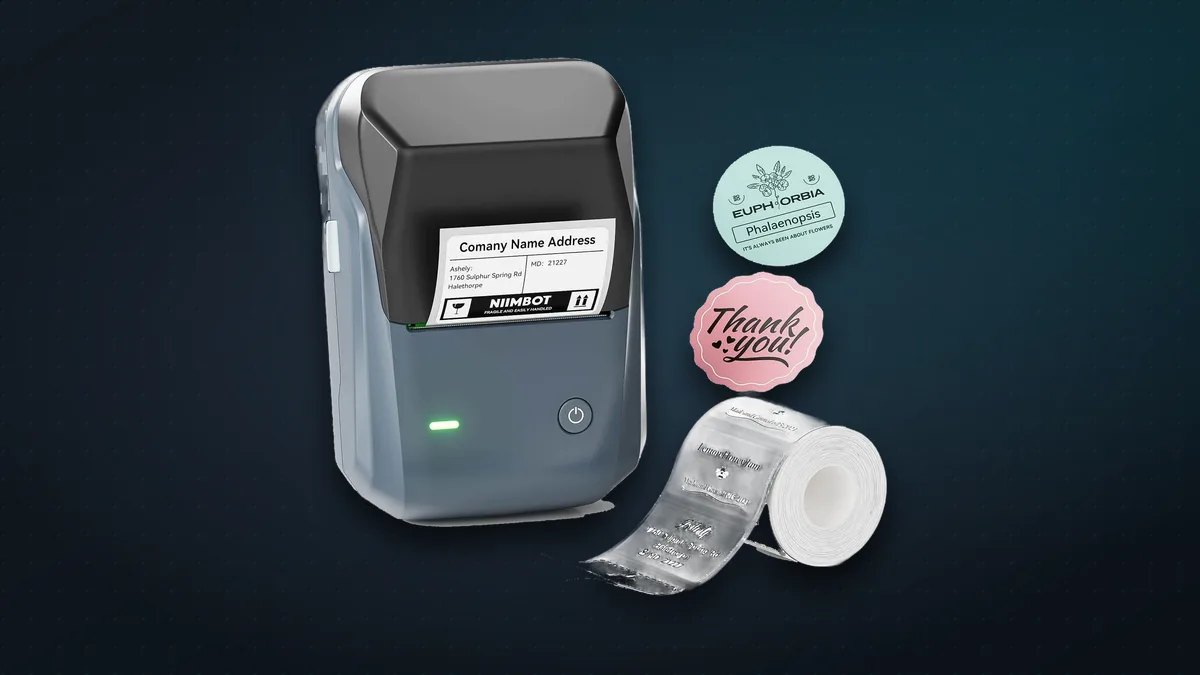
NIIMBOT B1 at a glance
| NIIMBOT B1 | |
|---|---|
| Price | $26.99 (NIIMBOT US store) |
| Printing | Direct thermal, so no ink or ribbon |
| Resolution | 203 dpi (the B1 Pro offers 300 dpi) |
| Label sizes | 20–50 mm wide, 20–200 mm long |
| Speed | Up to 50 mm per second |
| Battery | 1,500 mAh; NIIMBOT says about 5 hours of continuous printing |
| Connection | Bluetooth to a phone, USB to a computer |
| Charging | USB-C |
| Size and weight | 132 × 91 × 62 mm, 293 g |
What it’s good for
- The kitchen: jar and spice labels, freezer bags with dates, “use by” stickers.
- Cables and gadgets: label chargers and cables so you know which is which.
- Storage: boxes, files and drawers, with large text you can read from across the room.
- Small businesses: price tags, product labels, barcodes and QR codes, which NIIMBOT’s app can generate alongside text, logos and simple tables.
What’s good
- No ink, ever. Thermal printing uses heat-sensitive labels, so there’s nothing to replace except the labels themselves.
- The app does the hard work. You pick a template, type, add icons or a barcode, and print. Reviewers describe setup as simple once the app is installed.
- Bigger labels than mini label makers. Pocket models such as NIIMBOT’s own D110 print labels only up to about 15 mm wide; the B1’s 50 mm width is big enough for proper product and storage labels.
- Well reviewed by owners. It has more than 1,000 Amazon ratings, and a 4.5-star average from 271 reviews at Walmart.
The catches
- You need NIIMBOT’s label rolls. Owners report that the B1 works only with NIIMBOT-branded labels, so you’re tied to its prices; rolls on NIIMBOT’s store start at about $9. Buy a few with the printer.
- Black only. It prints in one colour, although you can buy coloured and clear label rolls.
- Thermal labels fade. Heat and strong sunlight can darken or fade them over time, so they’re not ideal outdoors or for things that must last for years.
- No iPad support, according to its Amazon listing. It works with iPhones and Android phones, and with Windows PCs over USB.
- One device at a time. NIIMBOT’s specs say it doesn’t support multiple Bluetooth connections, so a family can’t all print from their own phones at once.
- 203 dpi is fine, not fancy. Very small text and fine logos look crisper on the 300 dpi B1 Pro, which costs a little more.
B1 or something smaller?
Get the B1 if you want labels you can read easily: storage boxes, jars, products and price tags.
Get a mini label maker like the D110 if you only label cables, pens and spice jars and want something truly pocket-sized. NIIMBOT lists it at $15.99.
The bottom line
The NIIMBOT B1 isn’t exciting, which is exactly why it’s good. It’s cheap, needs no ink, and turns “I’ll organise that one day” into a ten-minute job. If you’ve ever wished your jars, cables or stock were labelled, buy it, and grab a couple of extra label rolls while you’re at it.
More gadgets worth your money: see our fact-check of 16 cool new gadgets.
Sources & further reading
Keep reading
OBSBOT Meet Flip: is the $119 foldable 4K webcam worth it?
The OBSBOT Meet Flip is a tiny 4K webcam that folds shut over its own lens. What it does well, where it falls short and who should buy it.
Read more →
16 cool new gadgets, fact-checked: what to buy, what to back and what to skip
We checked 16 viral gadgets, from a robot-arm monitor to a keychain Apple Watch charger. Five aren't on Amazon at all. What to buy, wait for or skip.
Read more →
Logitech MX Master 3S vs MX Master 4: which productivity mouse should you buy?
Logitech's MX Master 3S is now cheaper than ever, and the MX Master 4 adds haptics. Features, prices in the US and India, the catches, and which one to buy.
Read more →