The best Claude connectors in 2026: 12 worth turning on (and which work in India)
Claude connectors link Gmail, Spotify, Zomato, Notion and 1,000+ more apps to Claude. The 12 worth adding, what each can and can't do, and how to stay safe.
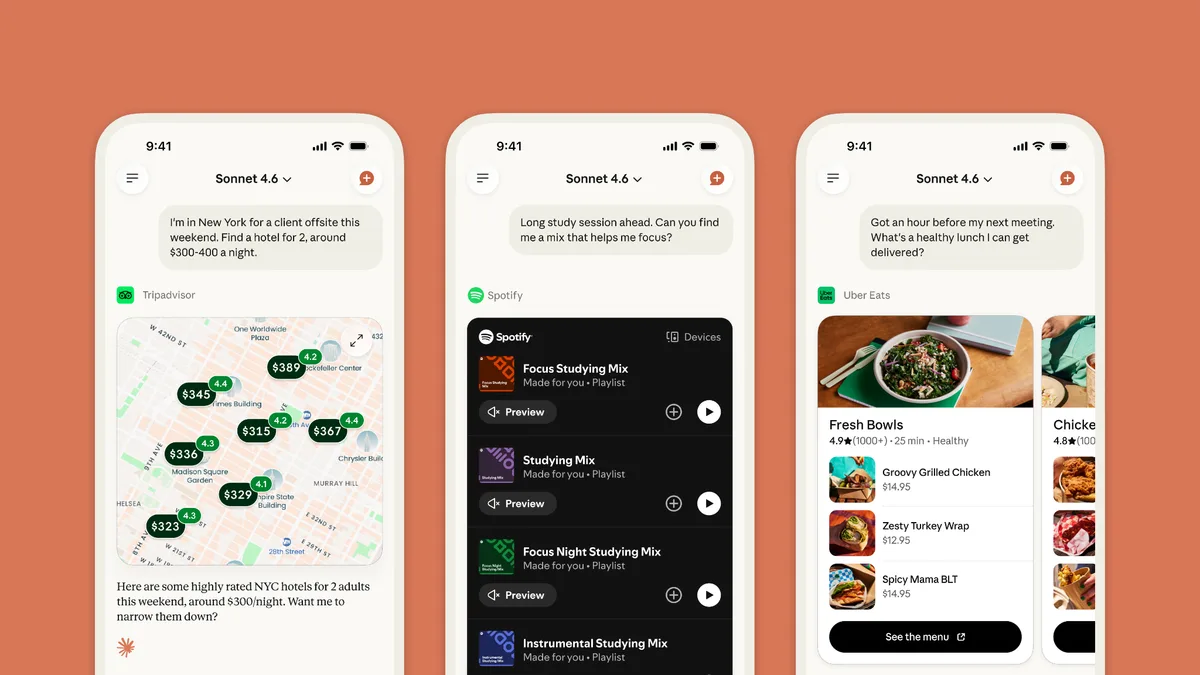
Connectors are how Claude stops being just a chatbot. Once you connect an app, Claude can read your inbox, check your calendar, build a Spotify playlist, compare hotels on Booking.com or even order dinner on Zomato, all from one conversation.
Anthropic launched its connectors directory in July 2025. In April 2026 it added everyday apps such as Spotify, AllTrails and Booking.com, and when we checked on 30 October 2026 the directory listed 1,045 connectors. You don’t need most of them. Here are the 12 worth turning on first, what each can and can’t do, and which are useful in India.
This guide is based on Anthropic’s connector listings and help pages, which show each connector’s tools and sign-in rules. Connectors change often, so check the listing before you rely on one.
What is a Claude connector?
A connector links Claude to another app or service so it can fetch your information and take actions there. Connectors are built on the Model Context Protocol (MCP), an open standard for plugging AI into tools; our MCP explainer covers how it works.
A few things worth knowing:
- They’re on every plan, including free. They work on the Claude website, the desktop app and the iPhone and Android apps (adding a connector on mobile is still in beta), and in Claude Code.
- Claude only sees what you can see. It uses your own account’s permissions in each app.
- Claude suggests them for you. Once an app is connected, Claude brings it in when it fits your request, so you don’t have to name it every time.
- Some are interactive. Connectors such as Canva, Asana, Slack and Figma show a live mini-app inside the chat that you can click through.
How to add a connector
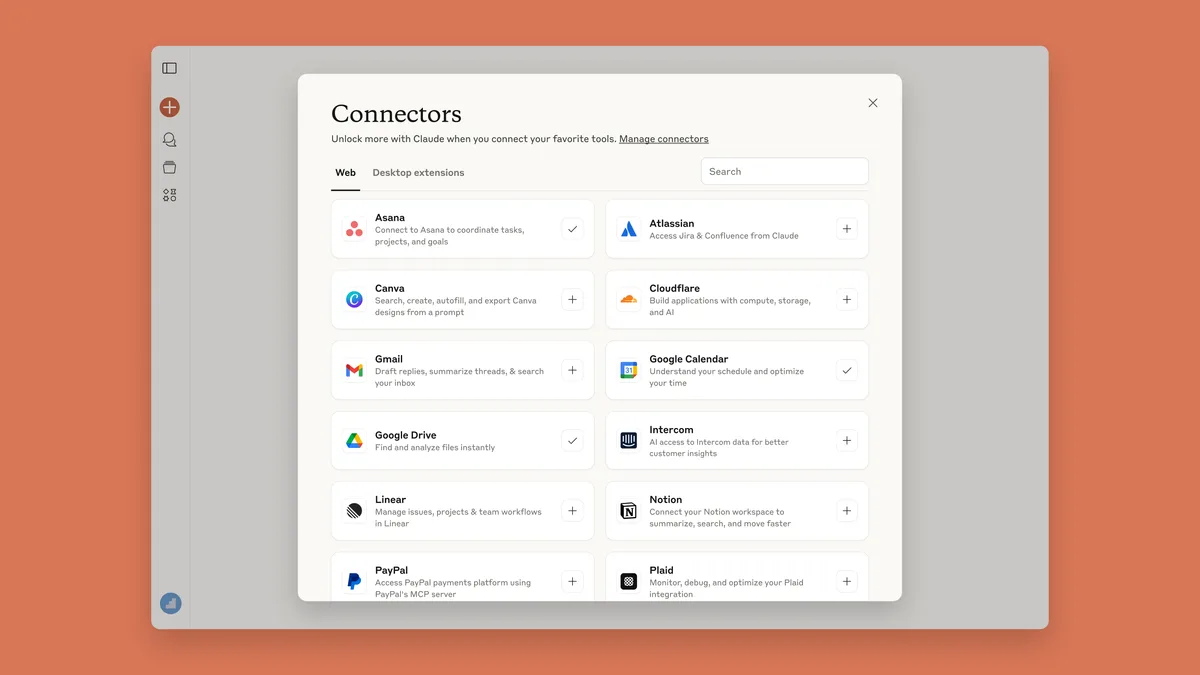
- In Claude, open Customize > Connectors and click + to browse the directory.
- Pick a connector, click Connect and sign in to that app if asked.
- In any chat, click + (or type /), hover over Connectors and switch on the ones you want.
Connectors you add on the web or desktop also appear in the Claude mobile app the next time you sign in.
The 12 best Claude connectors
Everyday life
1. Gmail, Google Calendar and Google Drive
Best for: almost everyone. These are three separate connectors, made by Google, and they’re most useful together.
- Gmail: search your inbox in plain English, read whole threads, draft replies, and send, reply or forward when you say so.
- Calendar: see your schedule, find a free slot that suits everyone, and create, move or decline events.
- Drive: find files even when you’ve forgotten the name, and read Docs, Sheets, Slides and PDFs. Separate Google Docs, Sheets and Slides connectors even let Claude edit a file live beside the chat.
Try: “Find the email with my flight booking and add the flight to my calendar.”
Good to know: by default, Claude asks before it sends, replies to or forwards an email, and before it shares, moves or bins a Drive file. It can’t open Gmail attachments (it only sees their names and details), and it ignores images inside documents. Anthropic says it doesn’t train its models on your Gmail, Calendar or Drive data.
2. Canva
Best for: quick social posts, flyers and slides. Claude can search your designs, create new ones, fill templates with your text and export the result. It’s an interactive connector, so the design appears right in the chat. You’ll need to sign in to Canva.
Try: “Turn these meeting notes into a five-slide Canva deck.”
3. Notion
Best for: people whose notes, plans and to-do lists live in Notion. Claude can search your workspace, and create, update, move and comment on pages and databases. Its tool list has no delete option, so it can’t remove your pages.
Try: “Find the page where we chose the launch date and add the action items to the project database.”
4. Spotify
Best for: music and podcasts on demand. Claude can search Spotify, build playlists, see what’s playing and add or remove tracks from your library. You can start without signing in, and Spotify works in India.
Try: “Make me a 45-minute playlist of 90s Bollywood songs for a Sunday drive.”
5. Zomato (India)
Best for: ordering food without leaving the chat. This connector, from Zomato’s parent company Eternal, can find restaurants near you, show menus with prices and ratings, build a cart, apply offers, place the order and track the delivery. You link it with your phone number and a one-time code, and you pay by scanning a QR code.
Try: “Find a well-rated South Indian place near me that delivers in 30 minutes, and build a cart for two.”
Good to know: this one places real, paid orders, so check the restaurant, address and total before you confirm. Its listing has no tool to cancel an order, so fix any mistakes in the Zomato app.
6. Booking.com, Tripadvisor and Expedia
Best for: planning a trip. None needs a sign-in, and all three cover destinations worldwide.
- Booking.com searches and compares stays by price, rating and what matters to you.
- Tripadvisor compares hotels on reviews, photos, prices and what’s nearby.
- Expedia searches hotels and flights with live prices.
Try: “Hotels in Goa for two from 12 to 15 December, under ₹8,000 a night, near the beach.”
Good to know: none of the three lists a booking tool, so you finish the booking on their site or app.
7. AllTrails
Best for: finding a walk or hike. AllTrails has more than 500,000 trails, and Claude can find routes near a place, give you the details and check the weather. You don’t need to sign in, which makes it one of the easiest connectors to try. Ask for something “shorter” or “dog-friendly” to narrow the list.
8. Strava
Best for: runners and cyclists. Claude can look through your activities, training zones, performance and gear to spot patterns and suggest what to work on. Its tools only read your data, so it can’t edit or upload activities. Sign in to Strava to connect it.
Try: “How has my 5K pace changed over the last three months?”
9. Todoist
Best for: personal to-do lists. Claude can add tasks, projects and comments, find what’s due, mark tasks complete and plan your day. Unlike Notion, it can delete things, so be specific when you ask it to tidy up.
Work
10. Microsoft 365
Best for: offices that run on Outlook and Teams. Made by Anthropic, it searches your company’s Outlook email and calendar, SharePoint, OneDrive and Teams chats, and can find a time when colleagues are free. Its tools only search and read, so it can’t send email or book meetings. On Team and Enterprise plans, an owner has to switch it on first.
11. Slack
Best for: catching up and staying on top of chats. Claude can search messages, channels and threads, read your canvases, and send messages or create canvases for you. It’s interactive, so a draft message appears in the chat for you to check and send.
Try: “Summarise what I missed in #marketing this week and draft a reply to anything that mentions me.”
12. Zoom
Best for: people who live in meetings. Claude can search your Zoom meetings and pull up AI summaries, transcripts, recordings and next steps, so you can ask “What did we agree with the client on Tuesday?” without hunting through recordings.
For teams, also look at: Asana, Linear, monday.com and Atlassian (Jira and Confluence), which handle tasks, issues and projects. Asana’s board even opens inside the chat.
Connectors that don’t help in India
Several of the April 2026 additions are built around services that don’t operate in India:
- Uber gives fare estimates only between two places in the United States, and hands you over to the Uber app to book.
- Uber Eats, Instacart, Resy, Zillow, TurboTax and Credit Karma aren’t available in India. For food, Zomato is the connector to use.
Is it safe to connect your apps?
Connectors can read and change things in your accounts, so it’s worth knowing the rules:
- You approve the important actions. With Google’s connectors, Claude asks before each action by default, such as sending an email, and Anthropic says Claude is designed to check with you before it books or buys anything.
- Your app data isn’t used for training. Anthropic says data from connected apps isn’t used to train its models, and a connected app can’t see your other Claude conversations.
- Trust the developer. Each connector’s tools are chosen by the company that makes it, and Anthropic warns that it can’t verify they work as intended. Stick to apps from companies you trust, and be careful with custom connectors, which Anthropic hasn’t reviewed.
- Turn things off when you’re done. You can switch a connector off for one chat, or disconnect it entirely under Customize > Connectors.
- Be wary of combining reading and doing. A connector that reads untrusted content, such as emails from strangers, and can also send or buy things is where mistakes happen. Keep approvals on for those.
Tips for getting the most from connectors
- Start with two or three. Use them for a week before adding more.
- Using 10 or more? Click + in a chat, hover over Connectors, then Tool access, and choose On demand. Anthropic says this leaves more room in each conversation.
- Chain them together. The real power is combining apps in one chat: find a free weekend in your calendar, compare hotels on Booking.com, then email the shortlist to your travel partner from Gmail.
- Build your own. If an app isn’t in the directory but offers an MCP server, add it under Customize > Connectors > Add > Custom. Free accounts can add one custom connector; paid plans can add more.
- On a Team or Enterprise plan, an owner must enable each connector, and can set every action to “Always allow”, “Needs approval” or “Blocked”.
The bottom line
For most people, Gmail, Google Calendar and Google Drive are the connectors that change how you use Claude day to day, with Notion or Microsoft 365 close behind for work. For fun and errands, Spotify, AllTrails and the travel trio are easy wins, and in India, Zomato is the standout: it’s one of the few connectors that can actually complete an order. Connect only what you’ll use, keep approvals switched on, and you’ll get a far more useful Claude.
Curious what Anthropic is doing next? See our explainer on Claude Duet, its new AI agent that keeps working in the background.
Sources & further reading
- Anthropic — New connectors in Claude for everyday life
- Anthropic — Discover tools that work with Claude (Connectors directory launch)
- Claude — Connectors directory
- Claude Help Center — Use connectors to extend Claude's capabilities
- Claude Help Center — Use Google Workspace connectors
- Claude Help Center — Use interactive connectors in Claude
- Claude — Zomato connector listing
- Claude — Microsoft 365 connector listing
- Claude — Uber connector listing
Keep reading
Claude Duet: Anthropic's new AI agent that keeps working when you don't
Claude Duet watches your email, calendar and business apps, briefs you each morning and works in the background. How it works, what it costs, the catches.
Read more →
Plaud Note Pro: the credit-card AI recorder that writes your meeting notes
A credit-card-thin AI recorder that transcribes and summarises your meetings and calls. What the Plaud Note Pro does, what it costs and who should buy one.
Read more →
Claude Code vs. GitHub Copilot vs. Cursor: which AI coding tool actually fits your workflow (2026)
Claude Code vs GitHub Copilot vs Cursor: an honest, workflow-first comparison of pricing, models and real strengths, and who each AI coding tool is for.
Read more →